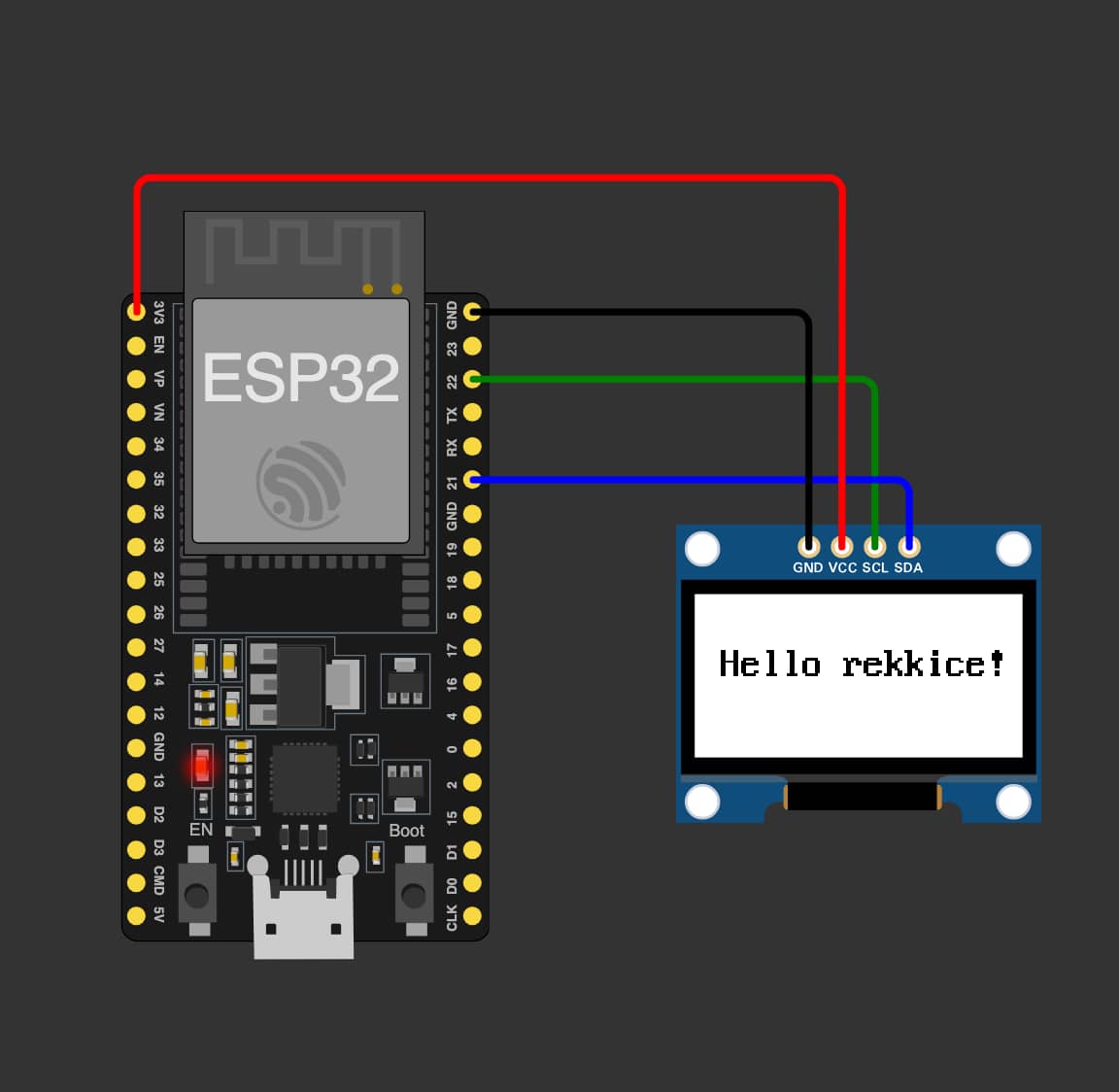
I’m encountering an issue getting the atomvm_ssd1306 driver to work on my ESP32 with AtomVM 0.6. When attempting to open the display port, I get the error “Failed to load port ‘display’. Ensure the port is configured properly in the build.”
AtomVM init.
I (935) sys: Loaded BEAM partition main.avm at address 0x250000 (size=1048576 bytes)
Starting application...
I (985) i2c_driver: I2C driver installed using I2C port 0
Failed to load port "display".  Ensure the port is configured properly in the build.
The error Failed to load port "display". Ensure the port is configured properly in the build. suggests a build configuration issue. I believe I’ve correctly added the atomvm_ssd1306 driver to the components directory.
Is there a specific idf.py menuconfig option I need to enable for this display driver to be recognized as a port, or another build step I’m missing? Any advice on how to properly configure this port in the build would be greatly appreciated!
Only one of atomgl or atomvm_ssd1306 should be used at a time. Based on the display_config it looks like you are really trying to use atomgl. The ssd1306 is one of several displays supported by atomgl. The older atomvm_ssd1306 diver predates atomgl and is sometimes desirable for its smaller footprint and simplicity. If you want to use avm_scene for more complex display orchestration then atomgl is definitely the right choice.
I would suggest removing (or disabling in menuconfig) one of the drivers and rebuilding and flashing your image.
I’m sorry, I should have included in my original post that I actually tried with only atomgl first and got the same Failed to load port "display" error.
This makes me wonder if there’s still a configuration step I’m missing for atomgl itself, even when it’s the only display component present.
Is there a specific idf.py menuconfig option I need to enable for atomgl to be recognized as the “display” port, or another build-time setting I’m missing?
Sorry it took so long to get back to you. We have been having some exiting weather in my corner of the world the last couple of weeks, and I was without power for several extended lengths of time.
It should just be found. I don’t think there is even a menuconfig option to disable including the component if it’s in the AtomVM/src/platforms/esp32/components directory, like many of the other drivers. Running idf.py reconfigure (or menuconfig - and remember to save before exiting) should be all that is required.
I would suggest checking to make sure that the returned i2c_host is actually a port() and not an error tuple, before including it your driver config passed to open_port/2.
I did notice in the atomgl docs for ssd1306 that the invert option isn’t explicitly optional, but it says it’s false by default… it could be that the documentation is misleading here… have you tried adding the invert option to your display_opts?
Another thing you can try to be sure that atomgl is linked into the VM is execute idf.py size-components and or idf.py size-files and you should see the atomgl component (or source files) listed in the results.
I hope this can help you sort out where the problem lies.
Thanks for the reply! the delay is completely fine.
I tried checking if the result of :erlang.open_port was an error tuple or not, but the program crashes during it, so the :io.format i put after it to inspect is never reached.
I also tried using both the invert: false and invert: true options, but it didn’t change the error.
The output of idf.py size-files didn’t seem to include any files related to atomgl.
I also recently tried compiling with the DHT driver (using the PR for IDF v5.x) and it worked perfectly, so i’m not sure if the problem is coming from the atomvm build step.
If you look at the last entry in the list there you will see libatomgl.a, that is what we were looking for. That means the compiled driver library is being included.
I’m glad to had success with the DHT sensor, that repo has not had much attention for a while, happy to know it still builds and works correctly.
I will see if I can get one of the more experienced Elixir devs to look into this, I work primarily in Erlang, so it’s entirely possible I am overlooking something simple.
In the meantime there is another thing you can try that I forgot to mention… Instead of starting the i2c driver and passing the port() in the i2c_host parameter try passing the i2c_opts (the configuration) as the i2c_host parameter (no call to :i2c.open/1). If you are using the main branch of AtomVM you might consider using the nif implementation in this case (i.e. use_nif: true in the i2c_opts).
Thanks for the continued help, and apologies for the delay in my response.
I tried the suggested approaches with the i2c_opts for the atomgl driver. I pulled the main branch of AtomVM and attempted the following combinations:
Passing i2c_opts directly to i2c_host in display_opts.
Using i2c_host: i2c_host as in my original code.
With use_nif: true in i2c_opts for both scenarios above.
Without use_nif: true.
Unfortunately, I’m still getting the exact same error with atomgl in all cases:
AtomVM init.
I (1077) sys: Loaded BEAM partition main.avm at address 0x250000 (size=1048576 bytes)
Starting application...
Failed to load port "display".  Ensure the port is configured properly in the build.
Return value: error
I (1107) AtomVM: AtomVM application terminated.  Going to sleep forever ...
It seems the issue persists regardless of how i2c_host is configured.
Thanks for offering to get more experienced Elixir devs to look into the display issue, that would be greatly appreciated. Let me know if there are any other configurations I can try in the meantime.
Can you tell us a little bit more about the hardware? Is this a board with the ssd1306 onboard, or are you using an esp32 dev board with an ssd1306 attached with DuPont wires? If you are using wires how long are they?
I made a CI run with atomgl included here: esp32-mkimage · petermm/AtomVM@ff5baef · GitHub if you scroll to bottom you can download an artifact to flash, make sure you grab the elixir variant if that is what you want.. keep us posted..
Thanks for the tip! Even if this doesn’t turn out to be the problem, it should be easy enough to add support for these displays. And of course PRs are always welcome