Is it a new movie documentary about Rebar and its secret development practices? No, it’s a plug-in!
rebar3_uncovered
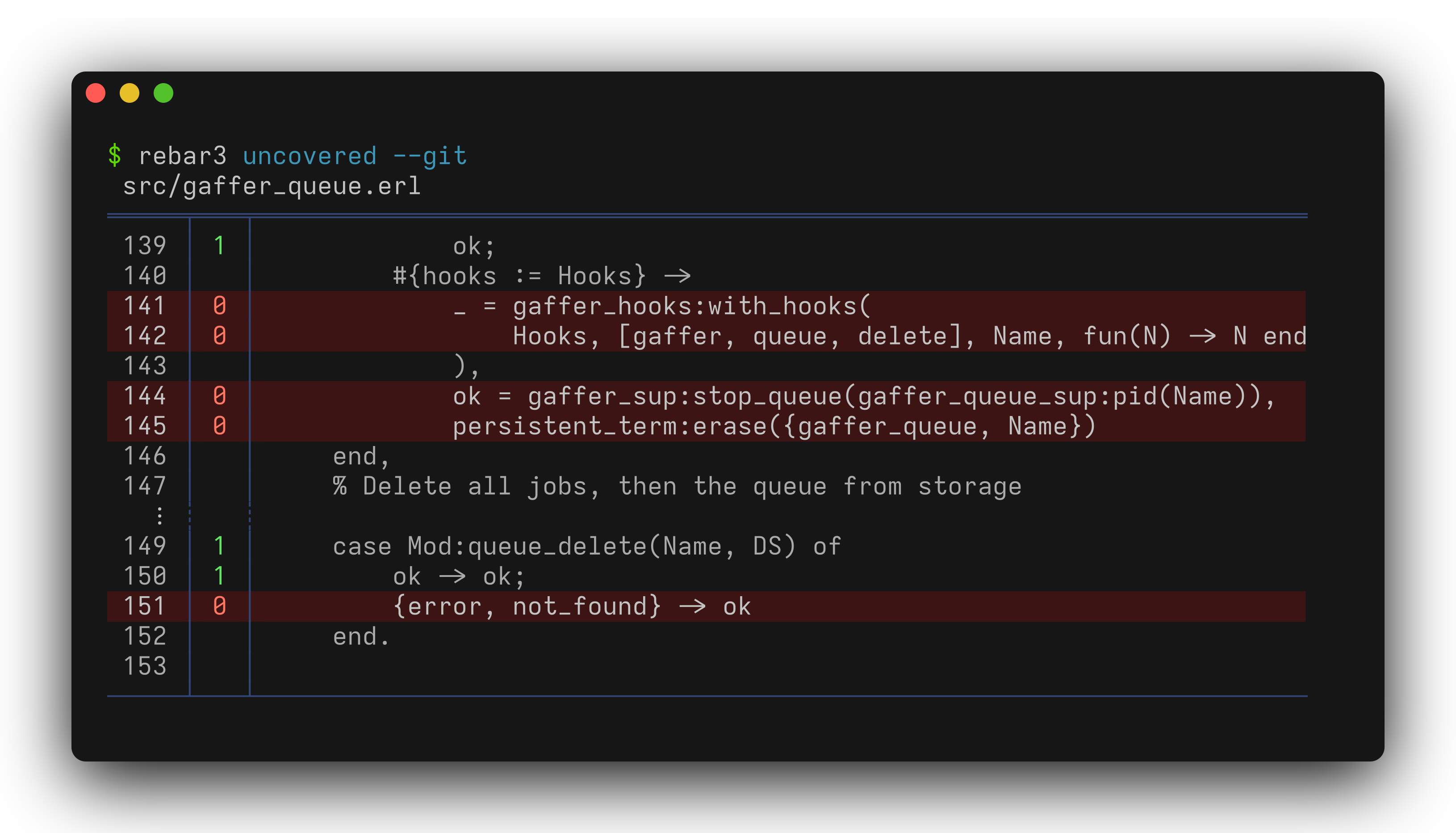
A Rebar 3 plugin that reports on uncovered lines from tests. Run it after rebar3 eunit or rebar3 ct to see which lines your tests missed. Use —git to narrow the report to lines changed since the last commit.
A machine-readable format is also available for script / CI / LLM consumption. Prefix with QUIET=1 to suppress Rebar’s own log messages:
$ QUIET=1 rebar3 uncovered --git --format=raw --context=0 --counts=false
src/gaffer_queue.erl:141             _ = gaffer_hooks:with_hooks(
src/gaffer_queue.erl:142                 Hooks, [gaffer, queue, delete], Name, fun(N) -> N end
src/gaffer_queue.erl:144             ok = gaffer_sup:stop_queue(gaffer_queue_sup:pid(Name)),
src/gaffer_queue.erl:145             persistent_term:erase({gaffer_queue, Name})
src/gaffer_queue.erl:151         {error, not_found} -> ok
Installation
Add the plugin to your project’s rebar.config:
{project_plugins, [rebar3_uncovered]}.
To install it globally for all projects, add it to ~/.config/rebar3/rebar.config:
{plugins, [rebar3_uncovered]}.
Usage
rebar3 uncovered [options] [-- path ...]
rebar3 help uncovered
Positional arguments after -- are used as file or directory filters.
Options
--help, -h
Show usage information and available options.
--git, -g
Filter uncovered lines to only those changed in the current git diff. Disabled by default.
--git-scope
Which part of the git diff to consider. Only has effect when --git is
enabled.
all(default) — both staged and unstaged changes
staged — only changes added to the index
unstaged — only working tree changes
--coverage
Which coverage data to use.
aggregate(default) — combine all test suites
eunit — only EUnit coverage data
ct — only Common Test coverage data
--format, -f
Output format.
human(default) — color-coded table with line numbers, coverage counts, and source context
raw — one line per uncovered line in a grep-like format suitable for
scripts, CI, or LLM consumption. Set the environment variable QUIET=1 to suppress Rebar’s own log messages for clean output
--context, -C
Number of covered lines to show around each uncovered line for context.
<integer>(default: 2) — number of context lines to show
0 — show only uncovered lines
all — show the entire function
--counts
Show how many times each line was executed. Use --counts false to hide the counts column. Enabled by default.
--color
Color output. Respects the NO_COLOR environment variable.
auto(default) — enable color when output is a terminal
I’m a fan of this. I’ve had this before in static analysis where, with the best will in the world, you are always trying to catch up so there is a whole lot of uncovered code, existing warnings etc. When you’re adding features you really want to ensure you’re at least not adding to the technical debt.
As an enhancement suggestion, you might also want to be able to specify a specific commit (or tag) to do the comparison against.
+1 on this – I tend to commit really small snippets of work to a branch (cf xkcd 1296; I do fix it all up later…), so comparing against the last commit isn’t enough; I’d prefer to compare to the start of the branch, or some commit a few hours ago, or whatever.
Thanks! Great suggestions, supporting Git SHAs I wanted to support already but supporting ranges might be cool too.
One problem though is you still would compare to the current cover data and the source might also differ so you can’t map the lines.
What would you expect to see in these cases? If you want to checkout an older commit and both run tests at check coverage for that commit, I’d suggest you script that outside of this plug-in.
I see the use case for this feature as something that could run in CI as a gating job (i.e. fail if you have introduced new uncovered lines on an attempt to merge to main).
Would it add too much complexity to check if the cover data is invalid on a module level basis? I’d still consider this a failure case mind.
Right, if the workspace is not dirty doing a check against the last commit makes sense. This should be easy to add.
For the case of going back more commits I think it gets complicated very quickly. Even if the uncovered lines match 1-to-1 there’s no guarantee that they would be covered if you would run the current tests against the old code. So the problem is: what question do you want answered?
Do the staged/unstaged tests cover some staged/unstaged lines?
Do the tests on HEAD cover some lines on HEAD?
Do the tests on HEAD cover some lines on HEAD~3?
Do the tests on HEAD~3 cover some lines on HEAD?
Do the tests on HEAD~3 cover some lines on HEAD~3?
1 is currently implemented, and 2 would be the suggestion above. I’m not sure how much sense 3 and 4 make, and 5 should be scripted outside the plug-in in my opinion.
Bounding it to (2) makes sense. Perhaps the other cases would be best handled by an example script? The less from-scratch work an individual developer needs to do, the more collective developer hours are saved.
Git organizes your working state as layers on top of trunk:
unstaged   # Edits not yet added to the index
staged     # Changes added to the index but not committed
HEAD       # The latest commit on this branch
HEAD~X     # Some intermediary commit between trunk and HEAD
trunk      # Base branch (origin/main, origin/master, …)
--git-scope picks which layer to diff against, which determines what counts
as “changed”:
auto(default): diff against trunk: branch commits, staged, and
unstaged all count
HEAD: only uncommitted work (staged + unstaged)
staged: only staged changes
unstaged: only unstaged changes
Any git ref (origin/main, HEAD~1, a commit SHA, etc.): diff against that
ref
Examples
Show uncovered lines in the dirty working tree before committing:
rebar3 uncovered --git --git-scope HEAD
Show uncovered lines on this branch against trunk:
rebar3 uncovered --git
In CI or in LLM tooling, check that all changed lines are covered by tests (raw
format, no context lines):
 No, it’s a plug-in!